New Batch Starting Soon Enroll Now!

New Batch Starting on 25 JAN 2025!


Are you looking for a simple and effective way to connect with local customers who are searching for your services right now? Commonly recognized by many as Google My Business, this free platform is essentially a digital storefront that manages your identity across Google Search and Google Maps.
Google My Business acts like a online identity for your shop / business that helps people trust you the moment they find you online.
Here are the most effective ways to use GMB to attract local visitors and grow your brand every day.
Google My Business is also called Google Business Profile is a platform where you can put all your important shop or business information in one single place for the whole world to see. It allows you to list exactly what your business does, your opening hours, and even collect valuable reviews from customers to build trust.
By regularly adding photos and videos of your work, you are providing the proof that makes your profile stand out to people searching. All these details act as a guide for Google, helping it understand your business so it can recommend you to the right audience. GMB allows you to control how your business information appears across Google Search and Maps.
When you keep your Google Business Profile updated, Google can easily match your shop with relevant searches made by customers. This ensures that whenever someone looks for a product or service you offer, your business appears as a top choice on their screen, helping you grow faster than ever.
By using Google My Business, you are creating a live profile that tells the world you are open, active, and ready to serve. For a beginner, the process is simple: you provide the facts about your business, and GMB turns those facts into a professional-looking profile that appears at the exact moment a customer is looking to buy.
Google My Business is where all your important information lives in one place. GMB works by connecting your shop / business information directly to Google. When someone searches for a service or business, Google finds the most relevant, closest, and trusted businesses to show first.
The system works by evaluating some main factors like: how far you are from the user, how well your profile matches their search, and how much other customers trust you through reviews. By simply keeping your information accurate and posting regular updates, you are giving Google Business profile the information it needs to recommend your shop / business over your competitors every single day.
By using Google My Business, you are creating a live profile that tells the world you are open, active, and ready to serve. For a beginner, the process is simple: you provide the facts about your business, and GMB turns those facts into a professional-looking profile that appears at the moment a customer is searching.
Google My Business and Google Business Profile are used interchangeably, and it can be confusing. The way you reach customers and grow your brand remains the same. While it is also called Google Business Profile, many people still refer to the management dashboard as their GMB profile or Google My Business account.
Whether people find you on Search or Maps, all the information comes from the exact same place : your GMB profile. On both platforms, customers can see your phone number, photos, videos, and reviews, and more. Your Google Business Profile ensures that your information stays consistent across the internet, whether someone is asking for driving directions or checking your reviews.
Whenever a customer searches for your business name or some information relevant to yours on Google Search, your profile appears as a with your details.
On the other hand, if someone uses Google Maps to search for "near me" services or your specific location, your shop shows up as a "map pin" to guide them directly to you.
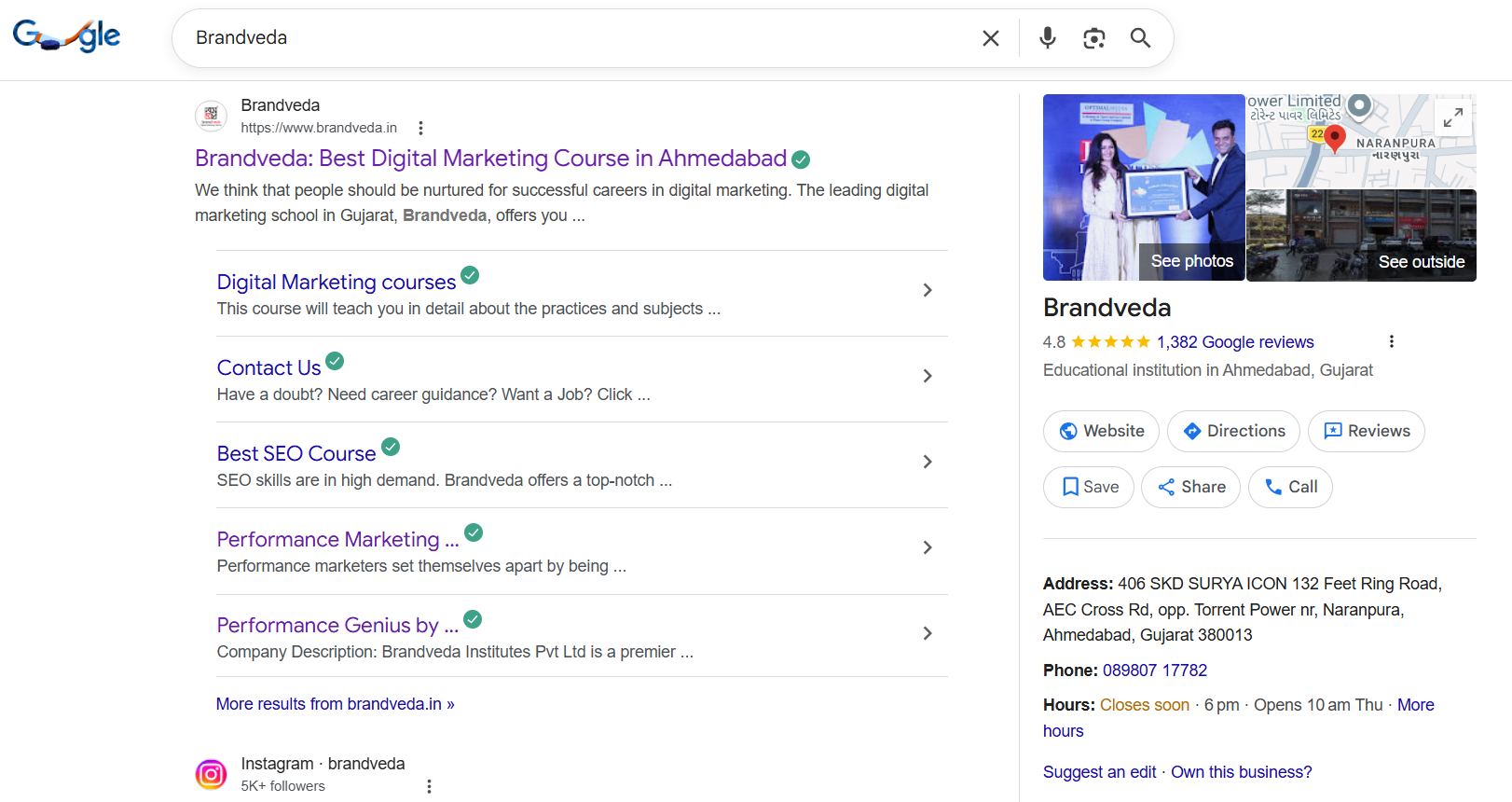
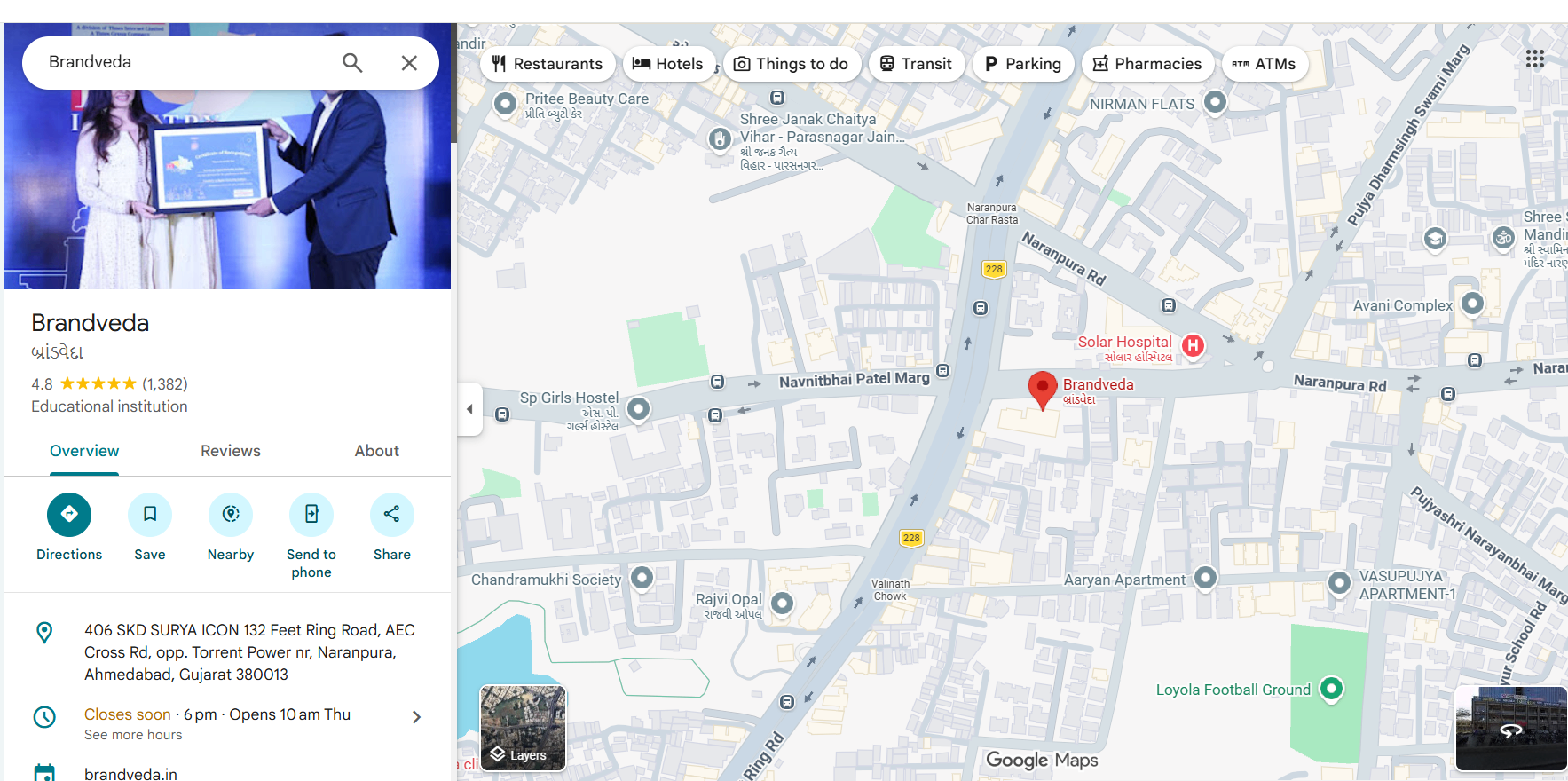
Google My Business (GMB) is the helps to show up your business / shop when a user is looking for information relevant to you. Having a strong GMB presence is about turning online searches into real-world sales and growing your reach. When customers can find you in one click, your business stays busy and grows much faster over time.
When you optimize your profile with great reviews and photos, you increase your local visibility and gain an edge over your competitors. This ensures that when a customer makes a relevant search, your business appears, capturing their attention.
GMB helps to improve customer engagement and online reputation. Positive customer reviews further enhance a business's credibility, driving more phone calls and visits from nearby customers seeking the services offered.
One of the greatest advantages of a GMB profile is the immediate boost in local visibility. When people in your area use Google Search or Google Maps, a well-optimized profile ensures your business appears in the search results. This means more eyes on your business and a greater chance of attracting new customers who are ready to buy.
Your GMB profile is the primary place where customers leave Google Reviews, and these testimonials heavily influence your online reputation. Customer reviews tells to user that your business is trustworthy and reliable. This builds trust and encourage other customers to leave a review as it helps your business to make online presence better increase authority for Google.
Your Google My Business account is where you can manage all the essential details about your company. GMB includes your business name, address, contact, opening and closing hours, reviews and more. This ensure customers always have the correct contact information and details about your shop or business.
Google My Business provides insights and analytics at performance dashboard shows you exactly how users interact with your GMB profile, offering a clear picture of your customer's journey. You can see which user query (search term) makes your business appear in google search and maps.
What actions they took like did they call you, visit your website, or request directions? This data is crucial for understanding your user experience to attract even more users.
Google My Business account allows you to create a online presence. It has various features that increase your local visibility on Google Search and Google Maps. GMB lets you put your business information such as your address, phone number, business hours, category, location, description and more. Google uses the information to represent your business.
When a user searches regarding your business, Google analyzes your profile to see if your business is relevant to "what the user is looking for". Google’s system carefully checks how accurate and complete your information is before deciding to show it to a user.
By keeping every detail correct and up-to-date, you provide the quality information that Google needs to trust your shop as a reliable solution.
One of the fundamental ways GMB works is through information matching. Google and other search engines cross-reference the business information you provide in your Google account with other data across the web. This includes your business name, business address, and phone number (often called NAP).
When your NAP is consistent everywhere online, it signals to Google that your business is legitimate and trustworthy. This consistency is a major factor in how high you rank in local search results. Inaccurate information can create confusion and lower your credibility.
Have you ever searched for something "near me"? That's the proximity check in action. Google prioritizes showing search results that are near to the user. Your GMB profile's address or defined service area tells Google where you are, making your physical location a key ranking factor.
When nearby customers search for services you offer, your GMB profile is more likely to appear in their search results on Google Search and Google Maps.
One of the most important factor in reputation building is customer reviews. Positive reviews proves your credibility and encourages new customers to choose you. These Google Reviews are displayed on your GMB.
By actively managing your profile and engaging with feedback, you show both customers and Google that you are a reputable and active business. This enhances your public image and also contributes to a higher ranking in search results.
Creating an effective Google My Business profile is vital for enhancing local visibility. Begin by ensuring that your business name, address, and phone number are accurate and consistent across all platforms. A detailed business description using relevant keywords can improve your ranking in local search results.
Engaging with customers through positive reviews and responding to negative feedback boosts your online reputation. Regular updates on business hours, services, and special offers keep potential customers informed and engaged.
Utilizing Google Posts can further enhance customer interaction, leading to a more robust online presence.
NAP stands for Name, Address, and Phone number. In this section, you can list your official business name, your exact address or physical location, and a working contact number so customers can reach you instantly. You can also add a detailed business description. Providing this relevant information ensures that when a customer searches for you, they find everything they need to connect with your brand right away.
By keeping your NAP (Name, Address, and Phone number) data accurate and consistent across the web, you help Google know that your business is real and professional. This accuracy builds immediate trust with users, making it much more likely that they will choose you over a profile with missing or confusing details.
Here’s why NAP consistency is so important:
Google My Business allows you to upload high-quality photos and videos to showcase your shop, products, or services to the world. The key is to make sure everything you post is highly relevant to your business. A GMB profile with high-quality media is far more engaging than one with just text. Businesses with photos see significantly more clicks to their website or requests for driving directions.
Use photos to showcase what makes your business unique. Upload pictures of your storefront, your team at work, your products, and happy customers. Videos can offer a behind-the-scenes look or highlight special offers. This content gives potential customers a real feel for your business before they even visit.
When a potential customer sees attractive and real images on your profile, they are much more likely to click on your business instead of a competitor with no photos. These visuals act as a "silent salesperson," building instant interest and giving people the confidence to visit your location. Regularly updating your photos and videos sends a signal to Google that your business is active. Profiles with fresh visual content often rank higher in search results.
To attract clients visually:
Google Business Profile allows your customers to share their honest opinions by reviews and star ratings based on their experience with your shop. These reviews are publicly visible on your profile, serving as a powerful "social proof" that tells new visitors whether your business is genuine and reliable.
When users see a high star rating and positive reviews on your Google My Business profile, they are much more likely to choose you over a competitor.
Engaging with reviews is just as important as collecting them. Responding to both positive and negative reviews shows that you value customer feedback and are committed to excellent service. This customer engagement builds loyalty and encourages more people to share their experiences.
Your total number of reviews and your average star rating directly affect your ranking on Google. The more positive feedback you receive, the more Google views your shop as a high-quality entity, pushing your profile higher in search results so even more local customers can find you.
To build trust through reviews:
Google Business Profile gives you a special feature to create posts to share the latest news about your shop. You can upload photos or videos sharing timely business information, promoting special offers, and announcing events.
By posting, you keep your customer aware of what is happening in your business and give them a reason to visit you again. These updates appear right on your profile to serve anyone who finds you through Google Search or Maps.
Regular updates signal to Google that your business is active, which can positively impact your online visibility and ranking. Each post is a new opportunity to attract new customers by highlighting what’s happening at your business right now.
Use Google Posts to:
Do you want customers to know exactly what you offer before they even click on your website? The product catalog and service list features on your Google My Business profile allow you to do just that. You can create detailed listings for your products and services, complete with names, descriptions, and even prices.
This feature gives new customers detailed information right in the search results, helping them make faster decisions. Instead of just listing a broad category, you can highlight specific items or services that set you apart from the competition. It’s a great way to showcase your offerings and attract qualified leads.
To highlight what you sell:
Understanding your customers is key to growing your business, and GMB's performance insights provide the data you need. This built-in analytics tool shows you how people interact with your business information on Google Search.
With these insights, you can see how many people found you, what search queries they used, and what actions they took. Did they call you, click to your website, or ask for directions? Analyzing this data helps you understand the user experience and identify what’s working, allowing you to refine your strategy to attract more new customers.
By regularly checking these analytics, you can understand your customers' behavior. Instead of guessing, you can use real data to make smart changes that help you rank higher and attract even more potential clients over time.
Adding your exact physical location to your Google Business Profile is one of the most important steps so when a customer finds your business on Google Maps or in local search results, they can simply tap the "Directions" button to get immediate navigation to your physical address. This seamless connection bridges the gap between online search and an in-person visit.
Having a clear and accurate location is essential because it removes any struggle for a customer trying to reach you. If a potential client is searching for a service nearby and sees that you have a verified location with easy-to-follow directions, they are much more likely to visit you.
Providing precise location data helps Google confirm your proximity to the user. This makes you much more likely to appear, effectively turning online searches into physical foot traffic and helping you beat competitors who haven't pinned their location accurately.
To make the most of this feature:
In conclusion, Google My Business is a platform for any business/shop to make its online presence. By optimizing your profile, you can significantly improve local visibility and attract more customers. The features of GMB such as name, address, phone number, photos, videos, reviews, posts and many more empower you to take control of your business online reputation and engage effectively with your audience. Whether you're a beginner or looking to refine your approach, understanding how to leverage GMB can lead to grow your business.
Yes, you can manage multiple business locations from a single Google My Business account. Google allows a business owner to create a "location group" to organize and update the business information for each business listing efficiently. This is ideal for chains or franchises looking to maintain consistent branding and details across all locations.
To update your address, sign in to your Google Business Profile manager. Select the location you want to edit, go to the "Info" tab, and click the pencil icon next to your business address. Enter the new, accurate information and save. Regular updates like this are crucial for maintaining your online visibility.
To get more Google Reviews, ask satisfied customers directly after a purchase or service. You can also send a follow-up email with a direct link to your review page. Responding to all customer reviews, both positive and negative, encourages customer engagement and shows that you value feedback, which helps build your online reputation.
Yes, several tools can help. Besides the built-in insights, you can link your Google My Business listing to Google Analytics and Google Search Console for deeper performance data. For broader digital marketing efforts, you can also integrate your profile with Google Ads to run local search campaigns and track conversions.
.jpg)

Are you looking for a simple and effective way to connect with local customers who are searching for your services right now? Commonly recognized by many as Google My Business, this free platform is essentially a digital storefront that manages your identity across Google Search and Google Maps.
Google My Business acts like a online identity for your shop / business that helps people trust you the moment they find you online.
Here are the most effective ways to use GMB to attract local visitors and grow your brand every day.
Google My Business is also called Google Business Profile is a platform where you can put all your important shop or business information in one single place for the whole world to see. It allows you to list exactly what your business does, your opening hours, and even collect valuable reviews from customers to build trust.
By regularly adding photos and videos of your work, you are providing the proof that makes your profile stand out to people searching. All these details act as a guide for Google, helping it understand your business so it can recommend you to the right audience. GMB allows you to control how your business information appears across Google Search and Maps.
When you keep your Google Business Profile updated, Google can easily match your shop with relevant searches made by customers. This ensures that whenever someone looks for a product or service you offer, your business appears as a top choice on their screen, helping you grow faster than ever.
By using Google My Business, you are creating a live profile that tells the world you are open, active, and ready to serve. For a beginner, the process is simple: you provide the facts about your business, and GMB turns those facts into a professional-looking profile that appears at the exact moment a customer is looking to buy.
Google My Business is where all your important information lives in one place. GMB works by connecting your shop / business information directly to Google. When someone searches for a service or business, Google finds the most relevant, closest, and trusted businesses to show first.
The system works by evaluating some main factors like: how far you are from the user, how well your profile matches their search, and how much other customers trust you through reviews. By simply keeping your information accurate and posting regular updates, you are giving Google Business profile the information it needs to recommend your shop / business over your competitors every single day.
By using Google My Business, you are creating a live profile that tells the world you are open, active, and ready to serve. For a beginner, the process is simple: you provide the facts about your business, and GMB turns those facts into a professional-looking profile that appears at the moment a customer is searching.
Google My Business and Google Business Profile are used interchangeably, and it can be confusing. The way you reach customers and grow your brand remains the same. While it is also called Google Business Profile, many people still refer to the management dashboard as their GMB profile or Google My Business account.
Whether people find you on Search or Maps, all the information comes from the exact same place : your GMB profile. On both platforms, customers can see your phone number, photos, videos, and reviews, and more. Your Google Business Profile ensures that your information stays consistent across the internet, whether someone is asking for driving directions or checking your reviews.
Whenever a customer searches for your business name or some information relevant to yours on Google Search, your profile appears as a with your details.
On the other hand, if someone uses Google Maps to search for "near me" services or your specific location, your shop shows up as a "map pin" to guide them directly to you.
Google My Business (GMB) is the helps to show up your business / shop when a user is looking for information relevant to you. Having a strong GMB presence is about turning online searches into real-world sales and growing your reach. When customers can find you in one click, your business stays busy and grows much faster over time.
When you optimize your profile with great reviews and photos, you increase your local visibility and gain an edge over your competitors. This ensures that when a customer makes a relevant search, your business appears, capturing their attention.
GMB helps to improve customer engagement and online reputation. Positive customer reviews further enhance a business's credibility, driving more phone calls and visits from nearby customers seeking the services offered.
One of the greatest advantages of a GMB profile is the immediate boost in local visibility. When people in your area use Google Search or Google Maps, a well-optimized profile ensures your business appears in the search results. This means more eyes on your business and a greater chance of attracting new customers who are ready to buy.
Your GMB profile is the primary place where customers leave Google Reviews, and these testimonials heavily influence your online reputation. Customer reviews tells to user that your business is trustworthy and reliable. This builds trust and encourage other customers to leave a review as it helps your business to make online presence better increase authority for Google.
Your Google My Business account is where you can manage all the essential details about your company. GMB includes your business name, address, contact, opening and closing hours, reviews and more. This ensure customers always have the correct contact information and details about your shop or business.
Google My Business provides insights and analytics at performance dashboard shows you exactly how users interact with your GMB profile, offering a clear picture of your customer's journey. You can see which user query (search term) makes your business appear in google search and maps.
What actions they took like did they call you, visit your website, or request directions? This data is crucial for understanding your user experience to attract even more users.
Google My Business account allows you to create a online presence. It has various features that increase your local visibility on Google Search and Google Maps. GMB lets you put your business information such as your address, phone number, business hours, category, location, description and more. Google uses the information to represent your business.
When a user searches regarding your business, Google analyzes your profile to see if your business is relevant to "what the user is looking for". Google’s system carefully checks how accurate and complete your information is before deciding to show it to a user.
By keeping every detail correct and up-to-date, you provide the quality information that Google needs to trust your shop as a reliable solution.
One of the fundamental ways GMB works is through information matching. Google and other search engines cross-reference the business information you provide in your Google account with other data across the web. This includes your business name, business address, and phone number (often called NAP).
When your NAP is consistent everywhere online, it signals to Google that your business is legitimate and trustworthy. This consistency is a major factor in how high you rank in local search results. Inaccurate information can create confusion and lower your credibility.
Have you ever searched for something "near me"? That's the proximity check in action. Google prioritizes showing search results that are near to the user. Your GMB profile's address or defined service area tells Google where you are, making your physical location a key ranking factor.
When nearby customers search for services you offer, your GMB profile is more likely to appear in their search results on Google Search and Google Maps.
One of the most important factor in reputation building is customer reviews. Positive reviews proves your credibility and encourages new customers to choose you. These Google Reviews are displayed on your GMB.
By actively managing your profile and engaging with feedback, you show both customers and Google that you are a reputable and active business. This enhances your public image and also contributes to a higher ranking in search results.
Creating an effective Google My Business profile is vital for enhancing local visibility. Begin by ensuring that your business name, address, and phone number are accurate and consistent across all platforms. A detailed business description using relevant keywords can improve your ranking in local search results.
Engaging with customers through positive reviews and responding to negative feedback boosts your online reputation. Regular updates on business hours, services, and special offers keep potential customers informed and engaged.
Utilizing Google Posts can further enhance customer interaction, leading to a more robust online presence.
NAP stands for Name, Address, and Phone number. In this section, you can list your official business name, your exact address or physical location, and a working contact number so customers can reach you instantly. You can also add a detailed business description. Providing this relevant information ensures that when a customer searches for you, they find everything they need to connect with your brand right away.
By keeping your NAP (Name, Address, and Phone number) data accurate and consistent across the web, you help Google know that your business is real and professional. This accuracy builds immediate trust with users, making it much more likely that they will choose you over a profile with missing or confusing details.
Here’s why NAP consistency is so important:
Google My Business allows you to upload high-quality photos and videos to showcase your shop, products, or services to the world. The key is to make sure everything you post is highly relevant to your business. A GMB profile with high-quality media is far more engaging than one with just text. Businesses with photos see significantly more clicks to their website or requests for driving directions.
Use photos to showcase what makes your business unique. Upload pictures of your storefront, your team at work, your products, and happy customers. Videos can offer a behind-the-scenes look or highlight special offers. This content gives potential customers a real feel for your business before they even visit.
When a potential customer sees attractive and real images on your profile, they are much more likely to click on your business instead of a competitor with no photos. These visuals act as a "silent salesperson," building instant interest and giving people the confidence to visit your location. Regularly updating your photos and videos sends a signal to Google that your business is active. Profiles with fresh visual content often rank higher in search results.
To attract clients visually:
Google Business Profile allows your customers to share their honest opinions by reviews and star ratings based on their experience with your shop. These reviews are publicly visible on your profile, serving as a powerful "social proof" that tells new visitors whether your business is genuine and reliable.
When users see a high star rating and positive reviews on your Google My Business profile, they are much more likely to choose you over a competitor.
Engaging with reviews is just as important as collecting them. Responding to both positive and negative reviews shows that you value customer feedback and are committed to excellent service. This customer engagement builds loyalty and encourages more people to share their experiences.
Your total number of reviews and your average star rating directly affect your ranking on Google. The more positive feedback you receive, the more Google views your shop as a high-quality entity, pushing your profile higher in search results so even more local customers can find you.
To build trust through reviews:
Google Business Profile gives you a special feature to create posts to share the latest news about your shop. You can upload photos or videos sharing timely business information, promoting special offers, and announcing events.
By posting, you keep your customer aware of what is happening in your business and give them a reason to visit you again. These updates appear right on your profile to serve anyone who finds you through Google Search or Maps.
Regular updates signal to Google that your business is active, which can positively impact your online visibility and ranking. Each post is a new opportunity to attract new customers by highlighting what’s happening at your business right now.
Use Google Posts to:
Do you want customers to know exactly what you offer before they even click on your website? The product catalog and service list features on your Google My Business profile allow you to do just that. You can create detailed listings for your products and services, complete with names, descriptions, and even prices.
This feature gives new customers detailed information right in the search results, helping them make faster decisions. Instead of just listing a broad category, you can highlight specific items or services that set you apart from the competition. It’s a great way to showcase your offerings and attract qualified leads.
To highlight what you sell:
Understanding your customers is key to growing your business, and GMB's performance insights provide the data you need. This built-in analytics tool shows you how people interact with your business information on Google Search.
With these insights, you can see how many people found you, what search queries they used, and what actions they took. Did they call you, click to your website, or ask for directions? Analyzing this data helps you understand the user experience and identify what’s working, allowing you to refine your strategy to attract more new customers.
By regularly checking these analytics, you can understand your customers' behavior. Instead of guessing, you can use real data to make smart changes that help you rank higher and attract even more potential clients over time.
Adding your exact physical location to your Google Business Profile is one of the most important steps so when a customer finds your business on Google Maps or in local search results, they can simply tap the "Directions" button to get immediate navigation to your physical address. This seamless connection bridges the gap between online search and an in-person visit.
Having a clear and accurate location is essential because it removes any struggle for a customer trying to reach you. If a potential client is searching for a service nearby and sees that you have a verified location with easy-to-follow directions, they are much more likely to visit you.
Providing precise location data helps Google confirm your proximity to the user. This makes you much more likely to appear, effectively turning online searches into physical foot traffic and helping you beat competitors who haven't pinned their location accurately.
To make the most of this feature:
In conclusion, Google My Business is a platform for any business/shop to make its online presence. By optimizing your profile, you can significantly improve local visibility and attract more customers. The features of GMB such as name, address, phone number, photos, videos, reviews, posts and many more empower you to take control of your business online reputation and engage effectively with your audience. Whether you're a beginner or looking to refine your approach, understanding how to leverage GMB can lead to grow your business.
Yes, you can manage multiple business locations from a single Google My Business account. Google allows a business owner to create a "location group" to organize and update the business information for each business listing efficiently. This is ideal for chains or franchises looking to maintain consistent branding and details across all locations.
To update your address, sign in to your Google Business Profile manager. Select the location you want to edit, go to the "Info" tab, and click the pencil icon next to your business address. Enter the new, accurate information and save. Regular updates like this are crucial for maintaining your online visibility.
To get more Google Reviews, ask satisfied customers directly after a purchase or service. You can also send a follow-up email with a direct link to your review page. Responding to all customer reviews, both positive and negative, encourages customer engagement and shows that you value feedback, which helps build your online reputation.
Yes, several tools can help. Besides the built-in insights, you can link your Google My Business listing to Google Analytics and Google Search Console for deeper performance data. For broader digital marketing efforts, you can also integrate your profile with Google Ads to run local search campaigns and track conversions.