New Batch Starting Soon Enroll Now!

New Batch Starting on 25 JAN 2025!

For most creators, the initial encounter with generative AI feels like a superpower. You type a prompt, you get an image, and for the first few iterations, the novelty carries the process. But once you move from casual exploration to professional delivery, the "magic" starts to fade. You find yourself trapped in a loop of prompt-crafting, download-management, and disparate browser tabs, all while struggling to keep your output consistent.
If your creative pipeline involves jumping between three different tools just to generate a concept, refine the lighting, and prepare an asset for a video sequence, you aren’t running a workflow; you are managing a series of disconnected chores. To scale, we have to stop treating AI as a "generate and done" plugin and start viewing it as a modular component in a structured assembly line.
The primary friction point for most content teams is the hidden cost of context switching. When you generate an asset in one tool, move to another for upscaling, and switch to a third for final composition, you aren't just losing time—you are losing control. Every time an image leaves one environment and enters another, you risk "consistency drift." Lighting, grain, and color palettes change subtly with every export, making it nearly impossible to build a cohesive visual brand without tedious, manual post-processing.
This prompt-hopping creates a false sense of productivity. You might generate fifty images in an hour, but if none of them fit the specific, standardized requirements of your project, you have produced noise, not assets. The shift in mindset here is crucial: instead of obsessing over the "perfect" prompt to solve every problem, you should aim to build a repeatable visual schema. You need a system that anchors your creative intent, keeping your brand identity stable while letting the generative layers provide the variation.
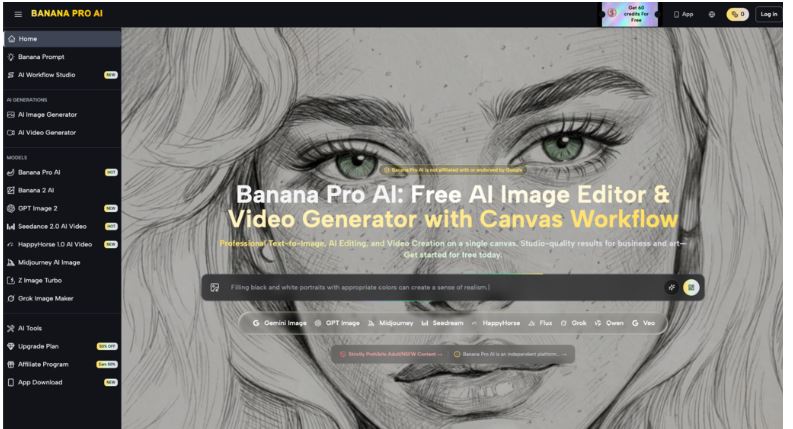
The goal of a professional creative operation is to move from ephemeral generation to persistent states. A centralized canvas environment acts as a workspace where assets live, evolve, and retain their context. When you adopt a hub-based approach—using Nano Banana Pro—you are essentially shifting from a "generate-export" mindset to a "canvas-edit" workflow.
By keeping your project within a unified workspace, you reduce the mechanical friction of moving files. More importantly, you gain the ability to iterate on specific elements without restarting from scratch. This architecture is vital for agencies and teams that handle recurring content types. When you have a dedicated space to manage versions, layers, and prompts, you stop chasing single images and start producing assets that actually belong to the same project.
However, it is important to reset expectations here: a tool does not automate creative judgment. No matter how sophisticated the model, the "system" is only as good as the creator's ability to define the constraints. If your brief is vague, the platform’s efficiency will only help you produce bad results faster.
Once you have a baseline, the next hurdle is refinement. Raw generative output is rarely production-ready on its own. This is where an AI Image Editor becomes the workhorse of your pipeline. The difference between a hobbyist and a pro is the capacity to bridge the gap between "generated content" and "finished asset."
Instead of asking the AI to "do everything," use the editor to surgically apply changes. If the composition is correct but the subject’s expression is off, or the lighting needs a slight shift to match a video sequence, you don't need a new prompt—you need localized, control-oriented editing. Modern workflows rely on layering generative outputs with manual control. You should view the AI as a collaborator that handles the heavy lifting of texture and light, while you maintain final authority over the composition and structure.
We must acknowledge that some elements remain stubborn. For instance, high-precision typography or complex, highly specific spatial layouts can often frustrate even the best generative models. Expecting perfection in every single generation is a fast track to burnout. The pragmatic approach is to recognize what the tool excels at and use manual post-editing to fill the gaps. Your workflow should be designed to accommodate these "undecidable" moments rather than fighting them.

Consistency is the ultimate boss battle for any AI-integrated team. When you are pushing out content across both static images and video, the "look and feel" can fall apart within seconds. If your static imagery carries a different aesthetic signature than your generated video, your audience will notice, and the perceived quality of your brand will suffer.
The solution is to link your image-to-image transformations directly to your video generation process. By using a consistent set of base imagery as the foundation for your motion assets, you ground the video in a familiar visual language. This prevents the "generative rot" that often happens when every frame is allowed to drift too far from the original concept.
Versioning is another under-discussed element of this workflow. If you aren't saving your intermediary states—the seeds, the base images, and the specific prompt variations—you will eventually find yourself unable to replicate a successful style. Treat your project file like a piece of code: if you can’t reproduce the result from the state you saved, you have broken your own pipeline.
Ultimately, the choice of tooling matters less than the architecture of your workflow. We are currently moving through a period of rapid feature-chasing, where creators jump from one model update to the next, hoping each will be the "magic button" that solves their production woes. But infrastructure-level thinking beats feature-chasing every single time.
When you invest time into building a repeatable process around tools like Nano Banana, you create a defensible advantage. You develop a library of proprietary seeds, prompts, and editing styles that become unique to your brand. The specific model version might change next month, but if your pipeline is modular and well-structured, you’ll be able to swap components without tearing down your entire operation.
The future belongs to the operators who prioritize systems over isolated outputs. By treating your creative production as an assembly line—balancing high-speed generative capability with the grounded, manual control required for professional deliverables—you move past the one-off trap and into a state of scalable production. Keep your focus on the workflow, keep your assets centralized, and accept that human oversight is, and will remain, the most important variable in the equation.
.jpg)

For most creators, the initial encounter with generative AI feels like a superpower. You type a prompt, you get an image, and for the first few iterations, the novelty carries the process. But once you move from casual exploration to professional delivery, the "magic" starts to fade. You find yourself trapped in a loop of prompt-crafting, download-management, and disparate browser tabs, all while struggling to keep your output consistent.
If your creative pipeline involves jumping between three different tools just to generate a concept, refine the lighting, and prepare an asset for a video sequence, you aren’t running a workflow; you are managing a series of disconnected chores. To scale, we have to stop treating AI as a "generate and done" plugin and start viewing it as a modular component in a structured assembly line.
The primary friction point for most content teams is the hidden cost of context switching. When you generate an asset in one tool, move to another for upscaling, and switch to a third for final composition, you aren't just losing time—you are losing control. Every time an image leaves one environment and enters another, you risk "consistency drift." Lighting, grain, and color palettes change subtly with every export, making it nearly impossible to build a cohesive visual brand without tedious, manual post-processing.
This prompt-hopping creates a false sense of productivity. You might generate fifty images in an hour, but if none of them fit the specific, standardized requirements of your project, you have produced noise, not assets. The shift in mindset here is crucial: instead of obsessing over the "perfect" prompt to solve every problem, you should aim to build a repeatable visual schema. You need a system that anchors your creative intent, keeping your brand identity stable while letting the generative layers provide the variation.
The goal of a professional creative operation is to move from ephemeral generation to persistent states. A centralized canvas environment acts as a workspace where assets live, evolve, and retain their context. When you adopt a hub-based approach—using Nano Banana Pro—you are essentially shifting from a "generate-export" mindset to a "canvas-edit" workflow.
By keeping your project within a unified workspace, you reduce the mechanical friction of moving files. More importantly, you gain the ability to iterate on specific elements without restarting from scratch. This architecture is vital for agencies and teams that handle recurring content types. When you have a dedicated space to manage versions, layers, and prompts, you stop chasing single images and start producing assets that actually belong to the same project.
However, it is important to reset expectations here: a tool does not automate creative judgment. No matter how sophisticated the model, the "system" is only as good as the creator's ability to define the constraints. If your brief is vague, the platform’s efficiency will only help you produce bad results faster.
Once you have a baseline, the next hurdle is refinement. Raw generative output is rarely production-ready on its own. This is where an AI Image Editor becomes the workhorse of your pipeline. The difference between a hobbyist and a pro is the capacity to bridge the gap between "generated content" and "finished asset."
Instead of asking the AI to "do everything," use the editor to surgically apply changes. If the composition is correct but the subject’s expression is off, or the lighting needs a slight shift to match a video sequence, you don't need a new prompt—you need localized, control-oriented editing. Modern workflows rely on layering generative outputs with manual control. You should view the AI as a collaborator that handles the heavy lifting of texture and light, while you maintain final authority over the composition and structure.
We must acknowledge that some elements remain stubborn. For instance, high-precision typography or complex, highly specific spatial layouts can often frustrate even the best generative models. Expecting perfection in every single generation is a fast track to burnout. The pragmatic approach is to recognize what the tool excels at and use manual post-editing to fill the gaps. Your workflow should be designed to accommodate these "undecidable" moments rather than fighting them.
Consistency is the ultimate boss battle for any AI-integrated team. When you are pushing out content across both static images and video, the "look and feel" can fall apart within seconds. If your static imagery carries a different aesthetic signature than your generated video, your audience will notice, and the perceived quality of your brand will suffer.
The solution is to link your image-to-image transformations directly to your video generation process. By using a consistent set of base imagery as the foundation for your motion assets, you ground the video in a familiar visual language. This prevents the "generative rot" that often happens when every frame is allowed to drift too far from the original concept.
Versioning is another under-discussed element of this workflow. If you aren't saving your intermediary states—the seeds, the base images, and the specific prompt variations—you will eventually find yourself unable to replicate a successful style. Treat your project file like a piece of code: if you can’t reproduce the result from the state you saved, you have broken your own pipeline.
Ultimately, the choice of tooling matters less than the architecture of your workflow. We are currently moving through a period of rapid feature-chasing, where creators jump from one model update to the next, hoping each will be the "magic button" that solves their production woes. But infrastructure-level thinking beats feature-chasing every single time.
When you invest time into building a repeatable process around tools like Nano Banana, you create a defensible advantage. You develop a library of proprietary seeds, prompts, and editing styles that become unique to your brand. The specific model version might change next month, but if your pipeline is modular and well-structured, you’ll be able to swap components without tearing down your entire operation.
The future belongs to the operators who prioritize systems over isolated outputs. By treating your creative production as an assembly line—balancing high-speed generative capability with the grounded, manual control required for professional deliverables—you move past the one-off trap and into a state of scalable production. Keep your focus on the workflow, keep your assets centralized, and accept that human oversight is, and will remain, the most important variable in the equation.