New Batch Starting Soon Enroll Now!

New Batch Starting on 25 JAN 2025!

I didn’t plan to care about PDF-to-PPT conversion.
It only became “important” the day a client sent me a 38-page strategy report in PDF and said:
“Can you turn this into a pitch deck before the 10 a.m. call?”
No source file. No editable slides. Just a locked document.
That’s usually the moment people realize one thing: PDFs are great for reading, terrible for working.
And if you’ve ever tried rebuilding slides manually, you already know how painful it gets. Misaligned text boxes. Broken spacing. Charts that refuse to behave. Sound familiar?
This is exactly why modern workflows now rely on structured conversion tools instead of manual rebuilds.
A practical starting point is using an online pdf to pptx converter that doesn’t just “extract pages,” but actually reconstructs slide logic.
That distinction matters more than most people think.
Most people blame the format. But PDF itself isn’t the issue.
The real problem is what happens when content becomes locked.
Once text is flattened, three things disappear immediately:
I learned this the hard way during a product launch deck.
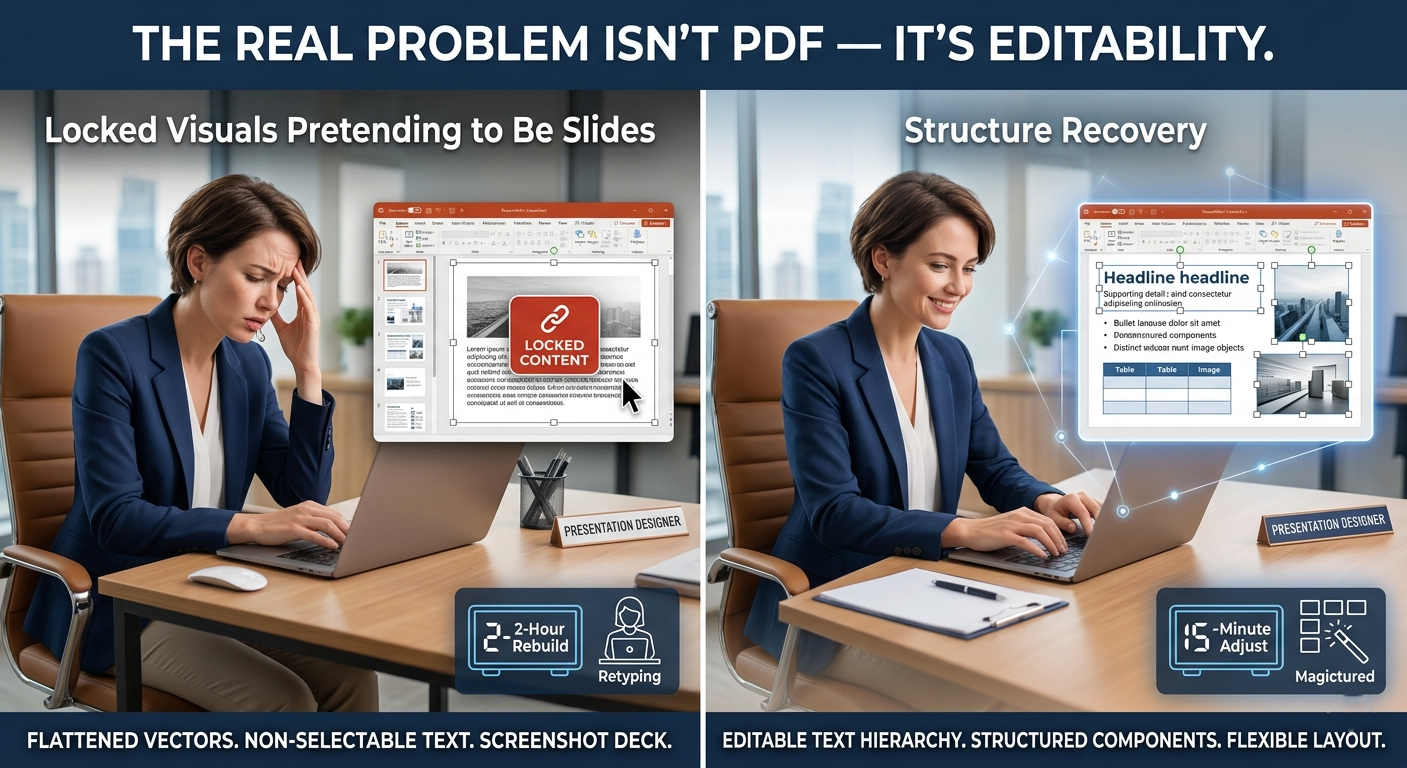
We had 12 slides. Simple content. But the PDF version came from a design team that exported everything as flattened vectors. What should’ve taken 15 minutes to adjust turned into a 2-hour rebuild.
And yes—we missed the internal review window.
That’s when I stopped treating conversion as “file transformation” and started treating it as “structure recovery.”

Here’s what most free tools quietly do:
They turn each page into a static image.
Looks fine at first glance. Until you try to edit it.
Then reality hits:
That’s not a presentation file. That’s a screenshot deck.
A proper workflow should rebuild editable components, not just replicate visuals.
This is where structured tools like a proper pdf to ppt pipeline become essential, especially when you’re dealing with client-ready materials or sales decks that need frequent updates.
Let’s define it clearly—because most people don’t.
A good PDF-to-PPTX conversion should feel like the original file was built in PowerPoint from the beginning.
That means:
If you still need to “fix everything afterward,” the tool didn’t really help you.
It just moved the problem.
Modern AI-based systems now try to interpret layout logic instead of blindly extracting content. Some even simulate how PowerPoint “master slides” work, rebuilding reusable structure instead of one-off pages.
That shift is subtle—but it changes everything in real workflows.
Let’s walk through a real workflow—not a theoretical one.
Drop your file into an online converter.
Could be:
One thing I noticed: anything under ~40 pages usually processes in under 60 seconds on modern tools. That used to take 10–15 minutes on desktop software.
This is the part most people underestimate.
A good system doesn’t just “read text.”
It identifies:
Think of it like reconstructing the logic behind the slide, not just the content.
Without this step, you get a visually correct but structurally useless deck.
Once exported, open the file in PowerPoint or Google Slides.
Now check something important:
Can you click into text and edit naturally?
If yes, you’re good.
If not, you’re dealing with a flattened export.
That difference decides whether you spend 5 minutes or 2 hours polishing the file.
I’ll be honest—this changed how I work.
I no longer ask: “Can this PDF be converted?”
I ask: “Can this structure survive reconstruction?”
That single shift makes it easier to choose tools, workflows, and even what format to request from clients.
When I started applying this thinking, my revision time for presentations dropped by roughly 40–50%. Not because tools got faster, but because I stopped rebuilding broken outputs.
For teams handling repeated presentation work, a consistent pipeline matters more than one-off conversions.
That’s where tools like AiPPT help standardize the process, especially when paired with structured conversion flows like pdf to powerpoint systems designed for editable output rather than static export.
It’s not about convenience anymore—it’s about avoiding rework cycles.
This is something most guides avoid saying.
Sometimes converting PDFs is the wrong move.
Skip it if:
In those cases, conversion creates noise instead of saving time.
Better to rebuild selectively than force automation.
If you regularly deal with presentations, proposals, or reused documents, PDF-to-PPTX conversion isn’t a side tool anymore.
It’s part of how you control information flow.
And once you’ve worked with a properly structured converter—even once—you’ll immediately notice the difference between “editable slides” and “locked visuals pretending to be slides.”
Try it on a real file. Not a clean sample.
A messy one. The kind you actually get from clients.
That’s where the value becomes obvious.
.jpg)

I didn’t plan to care about PDF-to-PPT conversion.
It only became “important” the day a client sent me a 38-page strategy report in PDF and said:
“Can you turn this into a pitch deck before the 10 a.m. call?”
No source file. No editable slides. Just a locked document.
That’s usually the moment people realize one thing: PDFs are great for reading, terrible for working.
And if you’ve ever tried rebuilding slides manually, you already know how painful it gets. Misaligned text boxes. Broken spacing. Charts that refuse to behave. Sound familiar?
This is exactly why modern workflows now rely on structured conversion tools instead of manual rebuilds.
A practical starting point is using an online pdf to pptx converter that doesn’t just “extract pages,” but actually reconstructs slide logic.
That distinction matters more than most people think.
Most people blame the format. But PDF itself isn’t the issue.
The real problem is what happens when content becomes locked.
Once text is flattened, three things disappear immediately:
I learned this the hard way during a product launch deck.
We had 12 slides. Simple content. But the PDF version came from a design team that exported everything as flattened vectors. What should’ve taken 15 minutes to adjust turned into a 2-hour rebuild.
And yes—we missed the internal review window.
That’s when I stopped treating conversion as “file transformation” and started treating it as “structure recovery.”
Here’s what most free tools quietly do:
They turn each page into a static image.
Looks fine at first glance. Until you try to edit it.
Then reality hits:
That’s not a presentation file. That’s a screenshot deck.
A proper workflow should rebuild editable components, not just replicate visuals.
This is where structured tools like a proper pdf to ppt pipeline become essential, especially when you’re dealing with client-ready materials or sales decks that need frequent updates.
Let’s define it clearly—because most people don’t.
A good PDF-to-PPTX conversion should feel like the original file was built in PowerPoint from the beginning.
That means:
If you still need to “fix everything afterward,” the tool didn’t really help you.
It just moved the problem.
Modern AI-based systems now try to interpret layout logic instead of blindly extracting content. Some even simulate how PowerPoint “master slides” work, rebuilding reusable structure instead of one-off pages.
That shift is subtle—but it changes everything in real workflows.
Let’s walk through a real workflow—not a theoretical one.
Drop your file into an online converter.
Could be:
One thing I noticed: anything under ~40 pages usually processes in under 60 seconds on modern tools. That used to take 10–15 minutes on desktop software.
This is the part most people underestimate.
A good system doesn’t just “read text.”
It identifies:
Think of it like reconstructing the logic behind the slide, not just the content.
Without this step, you get a visually correct but structurally useless deck.
Once exported, open the file in PowerPoint or Google Slides.
Now check something important:
Can you click into text and edit naturally?
If yes, you’re good.
If not, you’re dealing with a flattened export.
That difference decides whether you spend 5 minutes or 2 hours polishing the file.
I’ll be honest—this changed how I work.
I no longer ask: “Can this PDF be converted?”
I ask: “Can this structure survive reconstruction?”
That single shift makes it easier to choose tools, workflows, and even what format to request from clients.
When I started applying this thinking, my revision time for presentations dropped by roughly 40–50%. Not because tools got faster, but because I stopped rebuilding broken outputs.
For teams handling repeated presentation work, a consistent pipeline matters more than one-off conversions.
That’s where tools like AiPPT help standardize the process, especially when paired with structured conversion flows like pdf to powerpoint systems designed for editable output rather than static export.
It’s not about convenience anymore—it’s about avoiding rework cycles.
This is something most guides avoid saying.
Sometimes converting PDFs is the wrong move.
Skip it if:
In those cases, conversion creates noise instead of saving time.
Better to rebuild selectively than force automation.
If you regularly deal with presentations, proposals, or reused documents, PDF-to-PPTX conversion isn’t a side tool anymore.
It’s part of how you control information flow.
And once you’ve worked with a properly structured converter—even once—you’ll immediately notice the difference between “editable slides” and “locked visuals pretending to be slides.”
Try it on a real file. Not a clean sample.
A messy one. The kind you actually get from clients.
That’s where the value becomes obvious.